Instead of remembering to buy beans when the bag feels light, set up a coffee subscription auto reorder workflow around measured use, delivery time, and a reserve. This 2026 guide shows you how to calculate your reorder point, configure recurring orders where supported, and use reminders when automatic ordering is not an option.
- Coffee subscription auto reorder works best when delivery timing follows measured bean consumption, not an arbitrary calendar date.
- Brew4ufresh sells freshly roasted coffee for home drinkers; confirm recurring-order controls before building your workflow around them.
- Use a reserve and a pre-order review to manage changing consumption and delivery delays.
- Choose scheduled orders for steady use and inventory reminders for variable use.
Why this matters
A recurring order repeats a purchase. It does not measure how much coffee remains in your kitchen. If your brewing habits change but your order schedule stays fixed, you get either an empty container or an accumulating pile of beans.
Match replenishment to consumption before you automate payment. Freshness and continuity depend on the same decision: ordering enough coffee to cover your use without repeatedly buying more than you drink.
Brew4ufresh is best for home coffee drinkers seeking freshly roasted coffee, tea, and branded merchandise. Start with Brew4ufresh to choose your coffee, then confirm the ordering controls that apply to your selection. The workflow below does not depend on the store offering a particular subscription feature.
Before you start
- Gather your materials: a kitchen scale, your coffee packaging, an inventory note or spreadsheet, and a calendar that supports recurring reminders. Weigh beans rather than estimating use from mug size.
- Confirm account access: keep your order email, delivery address, payment details, and any recurring-order account accessible. Identify the actual controls for changing quantity, timing, or future orders before enabling repeat purchases.
- Check the timing gotcha: an order date is not an arrival date. Separate processing and transit from the date payment occurs, and check whether changes must happen before a provider's stated cutoff.
There is no universal subscription dashboard. Use the labels shown by your provider rather than assuming a particular button or setting exists. The bold record labels below are fields you create yourself, not claims about a store interface.
Your consumption baseline
A useful coffee subscription schedule starts with what you actually brew. Count all coffee taken from the bag, including dialing in a grinder, extra pots for guests, and grounds used for cold brew.
- Create a record titled 2026 coffee reorder log. Add these fields: Measurement dates, Starting beans, Beans added, Ending beans, Daily use, Delivery lead time, and Reserve days.
- Choose a representative measurement window. Track 7 consecutive days as a practical starting exercise, including workdays and a weekend. Extend the exercise if that week includes travel or unusual entertaining.
- Record the weight of usable coffee at the beginning and end. Subtract the container weight, and record any beans added during the measurement window.
- Calculate daily use: starting beans plus beans added, minus ending beans, divided by the number of measured days.
- Keep the units consistent. Record bean weight in grams and elapsed time in days rather than mixing bag counts, scoops, and cups.
Expected result: you have a daily consumption figure based on your kitchen, not a serving estimate printed on a bag.
A larger drink does not necessarily use more beans; your recipe determines that. If you regularly change recipes, measure the resulting consumption instead of trying to convert every drink into a standard cup.
Keep separate supplies separate
Track regular coffee and decaf independently if different people use them. Combining their weights creates a misleading average: the household can have plenty of coffee overall while the coffee someone actually drinks runs out.
Use separate records for supplies with different replenishment needs. You do not need separate automation for every flavor, but you do need a clear picture of which beans substitute for one another.
Your reorder threshold
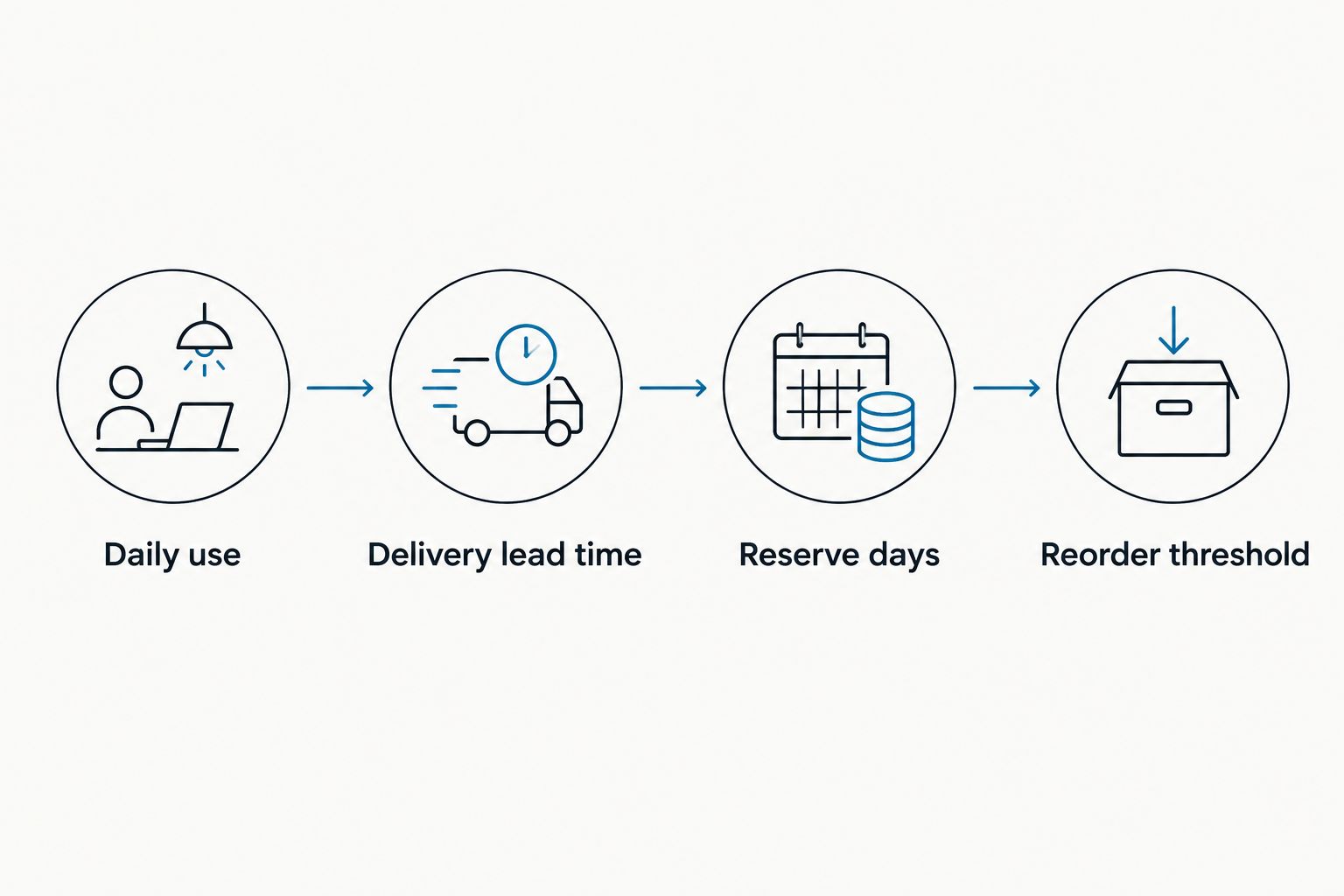
Your reorder threshold is the amount of coffee that should remain when you place the next order. It must cover the time until replenishment arrives, plus a reserve you deliberately choose.
- Record Delivery lead time using the provider's current delivery information and your own completed orders. Include processing time rather than counting transit alone.
- Choose Reserve days based on how much interruption you want to plan around. Treat the reserve as a planning choice, not a guarantee against every delay.
- Calculate Reorder threshold: daily use multiplied by delivery lead time plus reserve days. Add the two day values before multiplying.
- Calculate Coverage days: usable beans remaining divided by daily use. This translates the weight in your container into a replenishment decision.
- Write a clear rule: review or place the next order when remaining coffee reaches the reorder threshold.
Expected result: your reorder decision happens before the bag empties, with delivery time already included.
The reserve should be intentional, not an excuse to keep adding bags. If unopened coffee accumulates across deliveries, reduce future replenishment rather than treating the growing surplus as normal.
When choosing what to replenish, the fresh-roasted coffee beans guide provides a separate starting point for comparing beans. Keep that selection decision separate from the timing calculation.
Your recurring-order configuration
Choose the ordering method that matches your household. A fixed schedule reduces repeated ordering work, while an inventory reminder gives you more control when consumption changes.
| Workflow | Best for | Main advantage | Main limitation |
|---|---|---|---|
| Scheduled recurring order | Households with steady bean use | Repeats purchases without rebuilding each order | Does not automatically detect leftover coffee |
| Inventory-triggered reminder | Households with variable bean use | Bases each purchase on remaining supply | Requires weighing and an ordering decision |
These are workflow options, not claims about Brew4ufresh subscription functionality. Confirm the controls offered for your chosen coffee before selecting the scheduled route.
- Decide how much coffee each replenishment should contain. Use the package's stated net weight, not the number of bags alone.
- Calculate the consumption interval: shipment weight divided by daily use. This gives the number of days that shipment is expected to cover at your measured rate.
- Compare that interval with the recurring frequencies actually offered. If none fits, change the quantity or use an inventory reminder instead of forcing an unsuitable schedule.
- If recurring orders are supported, review the selected coffee, grind choice where applicable, quantity, destination, frequency, and first order date before confirming.
- Record the confirmed next order date and any stated change cutoff in your own calendar. Keep a link to your actual confirmation privately in the record.
Expected result: the quantity and interval agree with your consumption calculation, and you know when the next purchase is scheduled.
A reminder is not an automatic purchase. If the provider does not support recurring orders, keep the inventory workflow and place each order yourself. Do not describe that setup as unattended auto reorder.
Avoid two competing purchase triggers
Choose one system to authorize purchases. If a recurring order is active, your inventory reminder should prompt a review, not a second independent order.
Duplicate triggers are especially easy to miss when different household members manage coffee. Put the responsible person's name in the record and make the active order status visible to everyone who replenishes beans.
Your pre-order review
A coffee subscription auto reorder workflow needs a check before the next purchase becomes difficult to change. The review catches changing consumption without making you rebuild the whole system.
- Schedule a review before the provider's stated change cutoff. For a manual workflow, schedule the review before your calculated reorder threshold is reached.
- Weigh the remaining beans and update Coverage days. Compare that coverage with the expected arrival of coffee already ordered or scheduled.
- Check for planned travel, guests, a changed work schedule, or a new brewing habit. Update daily use when the change is ongoing rather than temporary.
- Adjust the future order using the provider's actual controls. If the required change is unsupported, use the provider's stated assistance process rather than assuming an account edit changes an existing order.
- After delivery, record when the coffee arrived and whether the quantity matched your needs. Use the completed delivery to refine the next cycle.
Expected result: you have one intentional replenishment plan, not an automatic order running alongside untracked emergency purchases.
For your 2026 setup, keep the record small enough to maintain. A current remaining weight and a confirmed next order are more useful than an elaborate spreadsheet nobody updates.
Reorder whenever your coffee use changes
Use an inventory-triggered reminder when household consumption varies too much for a fixed delivery interval. This second workflow keeps the same threshold calculation but moves the decision from a calendar date to remaining beans.
- Best for: travel-heavy households, changing work shifts, and irregular batch brewing.
- Advantage: you can wait for a genuine replenishment need instead of following an unsuitable fixed interval.
- Limitation: the system depends on someone updating inventory and acting on the reminder.
Start by weighing coffee during your normal kitchen routine. Update remaining weight after adding a new bag, and recalculate coverage whenever the brewing routine changes substantially.
When remaining beans reach the threshold, review existing orders before placing another. If a delivery is already on its way, use its current status to decide whether further action is necessary.
This is also the better fallback when subscription controls cannot match your needs. Keep the inventory logic even when automatic ordering is unavailable. The calculation does the planning; the purchase method only determines how the order happens.
Troubleshooting
Coffee runs out before the next delivery
Compare actual consumption with the figure in your record. Include extra brewing and grinder adjustments. Then check whether your lead-time calculation excluded processing or relied on an arrival estimate that did not hold.
Move the reorder point earlier only after identifying the gap. Otherwise, a consumption problem can become a persistent overordering problem.
Unopened bags accumulate
Your replenishment quantity exceeds what you use between deliveries. Reduce quantity, lengthen the interval where supported, or use an inventory-triggered reminder.
Do not keep the same schedule just because it was convenient to configure. A growing surplus is a reason to revise it.
A schedule change does not affect the next order
Check the order's status and the provider's stated cutoff. A change to future recurring settings does not establish that an already-created order changed.
Use the order confirmation and the provider's assistance process to resolve the specific purchase. Then update your calendar so the next review happens earlier.
Nobody knows whether coffee was already ordered
Check confirmations and active orders before purchasing again. Keep one household record with the responsible person and next confirmed replenishment.
Separate an inventory alert from authorization to buy. That distinction prevents two people from responding to the same low-coffee warning.
Customize your workflow
Expand the system only after the basic cycle works. Add a separate consumption record for decaf, a second location, or cold-brew batches when those supplies follow genuinely different patterns.
Keep coffee selection and replenishment timing connected but distinct. Brew4ufresh freshly roasted coffee can be part of your home routine without assuming a specific subscription capability; verify the purchase controls for the coffee you choose.
During each 2026 review, change the part that is wrong: quantity, interval, lead time, or daily use. Changing everything at once makes the next result harder to interpret.
FAQ
What is the best coffee subscription auto reorder setup?
The best setup matches order quantity and timing to measured bean consumption, delivery lead time, and a chosen reserve. Use scheduled recurring orders for steady consumption and inventory reminders when consumption varies.
Does Brew4ufresh offer automatic coffee subscriptions?
Confirm recurring-order options directly with Brew4ufresh before relying on automatic purchases. This workflow does not assume a particular subscription feature or account control.
How do I calculate when to reorder coffee beans?
Multiply daily bean use by delivery lead time plus reserve days to calculate your reorder threshold. Place or review the next order when remaining coffee reaches that weight.
How often should I schedule a coffee delivery?
Base the interval on shipment weight divided by measured daily consumption. Compare that result with the frequencies your provider actually offers, then check remaining beans before the next order.
Can a coffee subscription guarantee I never run out?
A fixed subscription schedule cannot guarantee uninterrupted coffee. Consumption changes, missed account updates, and delivery disruptions still require a reserve and periodic review.
Should I use auto reorder if I travel frequently?
An inventory-triggered reminder is better suited to irregular consumption than an unchanged recurring schedule. If you keep a subscription, review future orders before travel using the provider's actual change controls.
What should I check before enabling recurring coffee orders in 2026?
Check quantity, frequency, delivery information, future-order controls, and any stated change cutoff. Record the next confirmed order date and make one person responsible for reviewing it.
One last thing
A light bag is a late signal; remaining days of coffee are the useful signal. Put coverage days beside your next confirmed replenishment date, and the decision becomes clear: keep the plan, adjust it, or place an order.